Solo
The solo or new broker
Gmail, DAT, and a spreadsheet. No compliance person, so every carrier email is ten tabs and a knot in your stomach about double brokering.
A second pair of eyes on every email, and the reply already written.
The coverage workspace for freight brokers, inside Gmail
HauLens keeps today's loads, every carrier quote and the FMCSA check in one place, beside your inbox. When a carrier writes, it already knows which load they mean, who they really are, and what to answer. You cover the load. It does the legwork.
Email text never leaves your browser. HauLens does not use the Gmail API and never asks for permission to your mailbox.
Hi Mike,

Yes, still open.

Pickup: Dallas, TX, FCFS 9/18, 8:00 AM to 3:00 PM
Delivery: Atlanta, GA, appointment 9/19 at 9:00 AM
Dry van, auto parts, 40,000 lbs, no touch
Rate: $2,400

Thank you,
What it is
HauLens holds the loads you are covering, the quotes coming in on each one, and the FMCSA record of every carrier who writes. The reply is the last step, not the point. Four jobs, one place, no tabs.
Seven steps. Four tabs. Forty times a day.
Three steps. No tabs. The quote is already on the load.
Your workspace
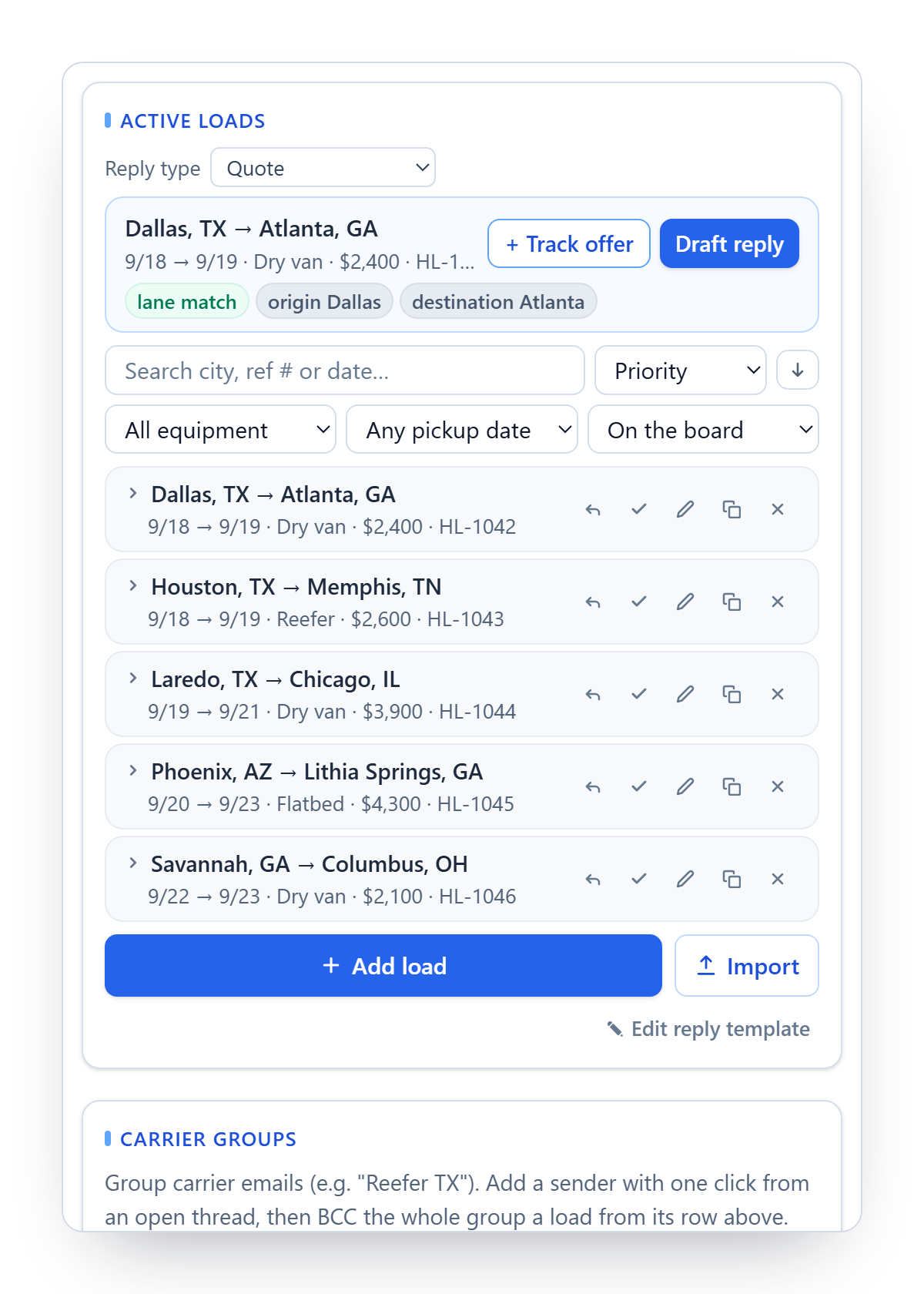
Not another TMS. The loads you are covering today, every quote on its load, the carrier vetted beside it, and what is still open. It sits next to your inbox and matches itself to every email you open.
Who is it for?
If carriers reach you in Gmail and your loads live in a spreadsheet, a load board, or a basic TMS, this was built for your desk.
Gmail, DAT, and a spreadsheet. No compliance person, so every carrier email is ten tabs and a knot in your stomach about double brokering.
A second pair of eyes on every email, and the reply already written.
Carrier sales reps on Google Workspace. Reps re-vet the same carriers, quotes live in heads and inboxes, and the owner cannot see what is covered.
One shared board. Every quote on its load. Everyone sees what is left.
You run your own book inside a larger network and pick your own tools. Every minute on a carrier email is a minute not spent on the next load.
Your own tool, set up in two minutes. No rollout, no IT ticket.
Nothing to migrate. Keep your TMS, keep DAT, keep Gmail.
How it works
It is 9:02 on a Tuesday. This is the next half minute.
9:02 AM
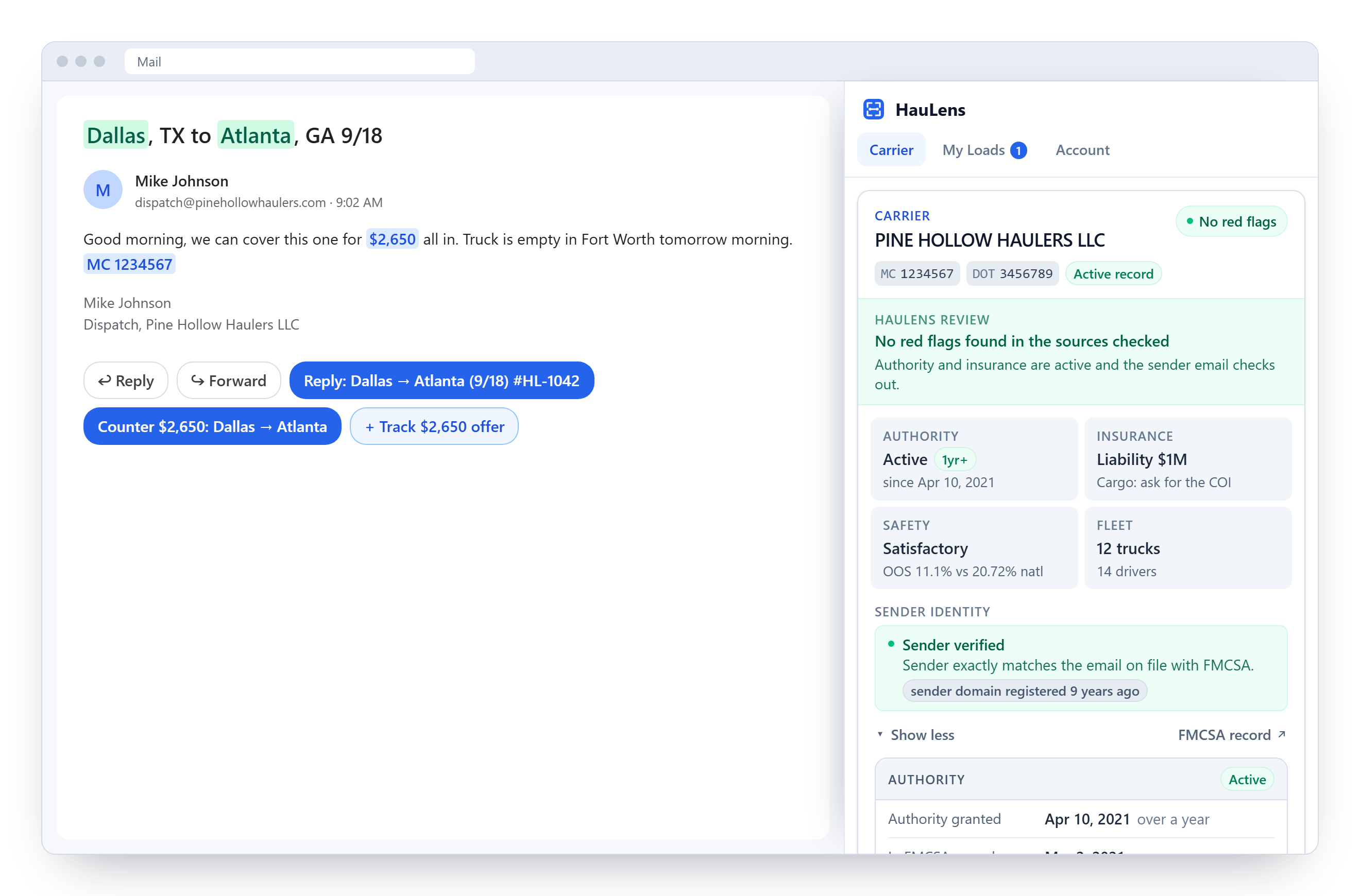
Mike at Pine Hollow Haulers says he can do it for $2,650. HauLens has already picked out his MC number and recognized the lane. Under his email sit three buttons that were not there before.
 123
123Still 9:02
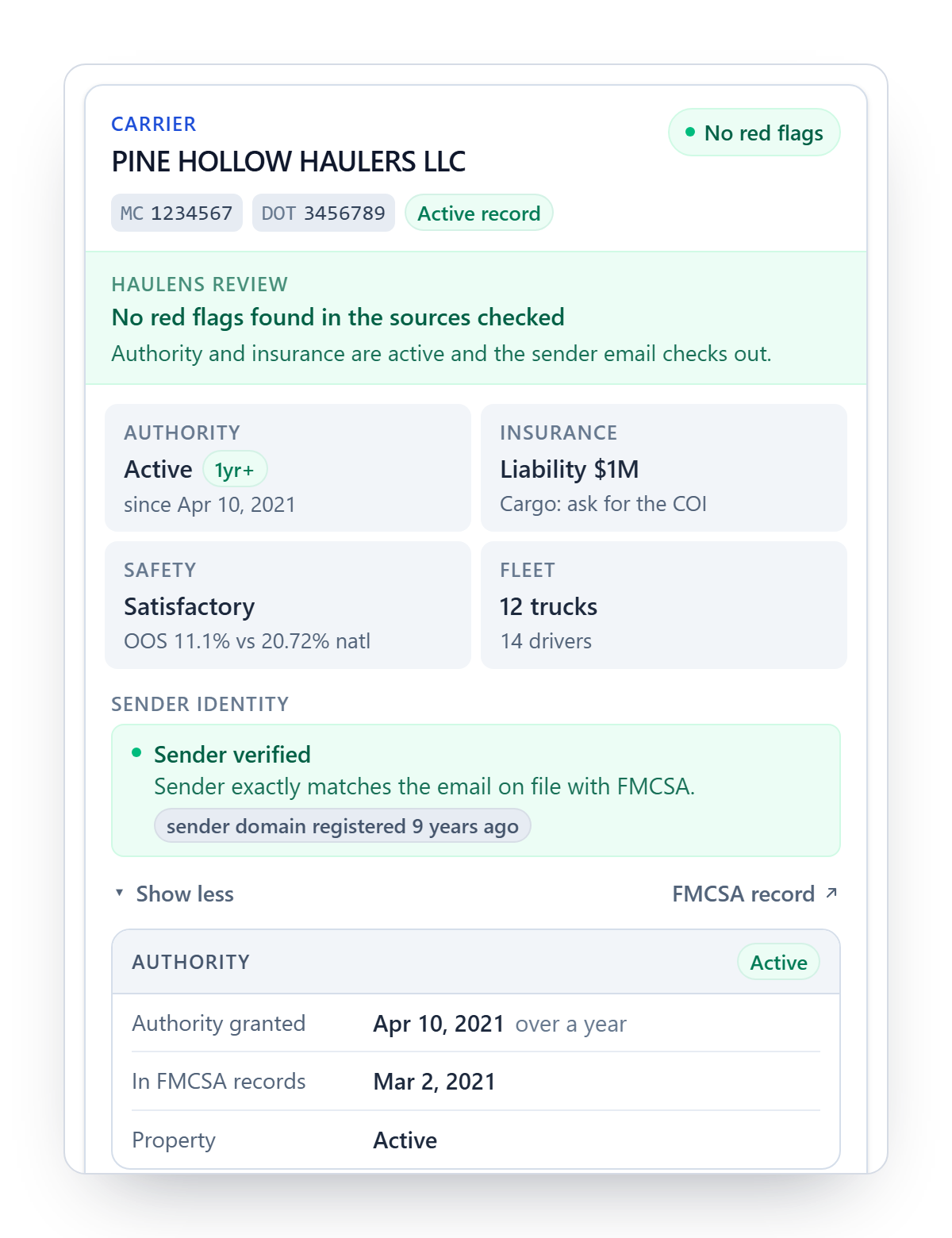
Authority active since 2021, $1,000K insurance on file, satisfactory rating, 12 trucks. The address he is writing from is the one FMCSA has on file, on a domain that is nine years old. Nothing to chase. You keep going.
 123
1239:03, sent
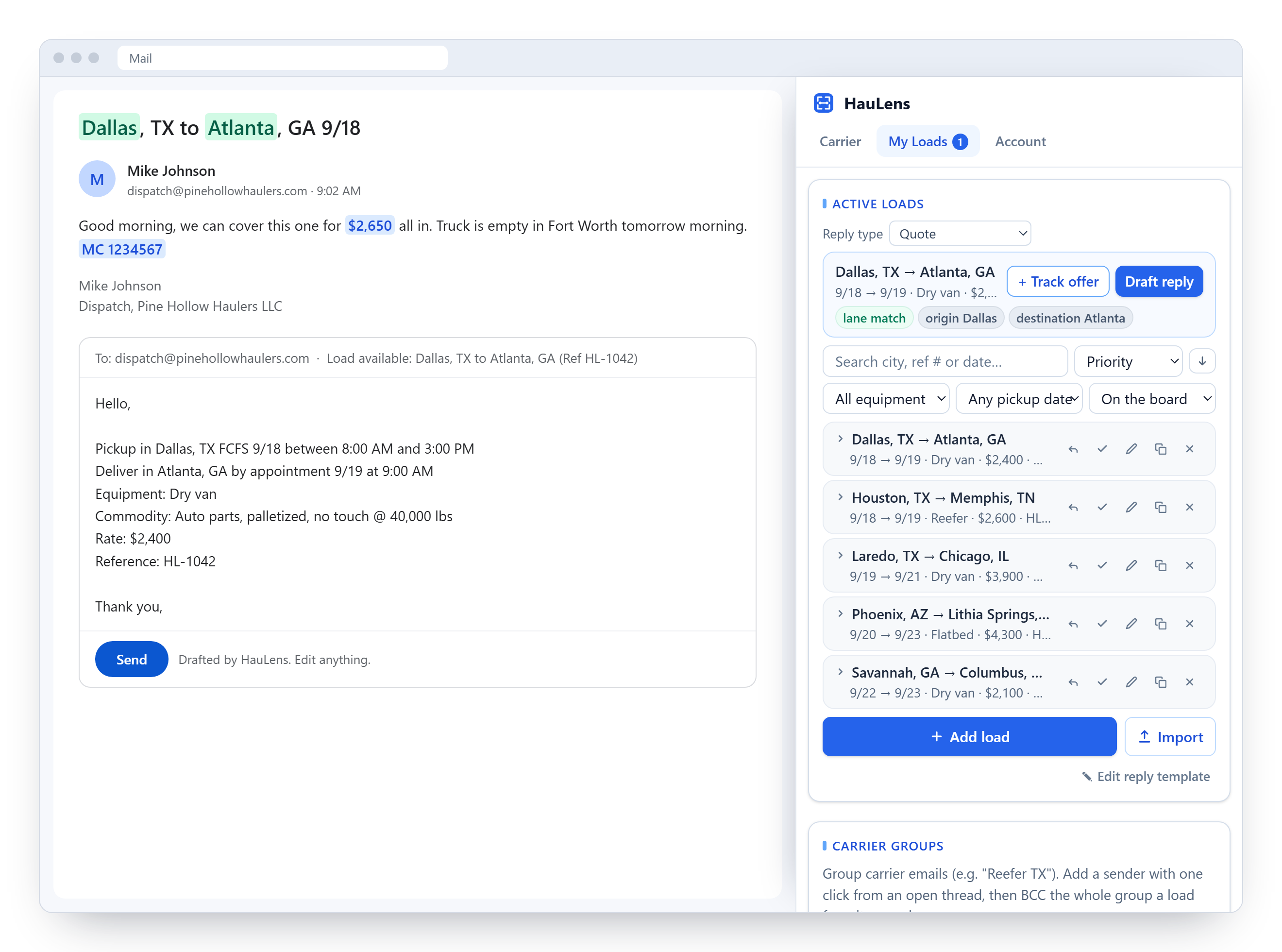
The right load, your pickup window, your rate, in your wording. You change one line and hit send. His $2,650 is saved on the load, next to the other quotes.
 123
123That was quick. On to the next one.
Add to ChromeSample data. Pine Hollow Haulers, Mike, MC 1234567 and every figure in this walkthrough are invented for the demonstration; any resemblance to a real company is coincidental.
What it catches
Double brokering and identity theft start with a convincing email. HauLens puts the evidence next to the message, and leaves the call to you.
Everything in it
None of these is a headline on its own. Together they are why covering a load stops feeling like seven jobs.
The carrier's whole record, before you finish their first sentence.
Authority history with dates, insurance filings against what is required, out-of-service rates against the national average, fleet size, and one click to the FMCSA record.
A good MC proves nothing if someone else is using it.
The sender checked against the FMCSA contact, the age of their domain, forwarded emails traced to the original sender, and a warning under your reply when something is off.
Forty replies a day, none typed from scratch.
Quote, counter, availability list, and info request, all in your wording. Buttons appear under the email, or press Ctrl+Shift+L.
Your spreadsheet goes in once. After that it just knows.
Excel, CSV, Sheets, or pasted DAT postings. FCFS windows and appointments, military time too. Covered and inactive loads stay one search away.
Every number a carrier gives you, kept where it belongs.
Read from the email in one click, updated as the thread goes on, and the board sorts itself by what needs working next.
Your trusted carriers, one click from any load.
Save the carriers you like into named groups straight from their emails, then send a load to the whole group as one BCC draft. The lists stay on your computer.
One board for the whole office.
Assign a load to a broker, keep some private, see what is covered and what is not. It follows you across computers.
It reads the page you are looking at. Nothing more.
No mailbox permission, ever. Only the MC numbers you look up, the sender's domain, and the loads you enter reach our servers.
From the beta
Feels like it was built specifically for the way I work. I can vet carriers quickly without jumping between multiple systems, and I only have to enter load details once. From there, every carrier inquiry is handled faster because all the information is already at my fingertips. It's saved me time, reduced repetitive work, and made my day-to-day operations much more efficient.
Open beta
The next quote could be yours.The beta is open to any broker on Gmail. Add it to Chrome, then tell us what it saved you, or what it got wrong.Write to us →Free carrier lookup
No account, no install. The same FMCSA record the extension shows, on its own page you can share.
Privacy, plainly
Questions
HauLens is the coverage workspace for freight brokers, and it lives inside Gmail as a Chrome extension. It holds the loads you are covering, saves every carrier quote on its load, checks each carrier against FMCSA records and confirms the sender is really that carrier, and drafts your reply from the load they are asking about. Keep your TMS, keep DAT, keep Gmail: HauLens is the place they meet.
Add HauLens from the Chrome Web Store, sign in with Google, and open Gmail. It takes about two minutes and there is nothing to migrate.
It is free during the beta. If that ever changes you will hear about it well before, and you can leave with one click.
No AI writes your replies and nothing invents a rate. Matching and drafting follow fixed rules and run on your computer. The text of your emails never leaves your browser, and HauLens does not use the Gmail API or ask for permission to your mailbox.
It compares the address a carrier is writing from with the contact FMCSA has on file for that MC number, shows how old the sender domain is, and flags new authority, insurance below the required amount, and out of service orders. The evidence sits beside the email. The decision stays with you.
Keep it. HauLens is the layer inside your inbox, not an onboarding system. It shows FMCSA evidence beside the email and leaves the booking decision, and your approved carrier process, with you.
FMCSA and US Department of Transportation public records. FMCSA stays the record of authority.
Not yet. Gmail in Chrome today, Outlook next.
Bring your loads in with one spreadsheet drop. Your board is ready in a minute, and the first reply takes a click. If it ever gets an email wrong, forward it to contact@haulens.ai. A person reads every one.